---
title: Adding forms to a checklist
description: Learn about the different ways you can easily add forms to a checklist for future or current employees.
---
[Skip to content](https://support.careerplug.com/adding-forms-to-a-checklist#main-content)
[Submit a Request](https://support.careerplug.com/kb-tickets/new?hsLang=en)
[![CareerPlug-Logo-2025.png\]](https://support.careerplug.com/hs-fs/hubfs/CareerPlug-Logo-2025.png?width=230&height=40&name=CareerPlug-Logo-2025.png)](https://support.careerplug.com?hsLang=en)
Open main navigation
Close main navigation
- [Submit a Request](https://support.careerplug.com/kb-tickets/new)
- [Get help now!](https://support.careerplug.com/help)
[Get help now!](https://support.careerplug.com/help?hsLang=en)
How can we help?
- There are no suggestions because the search field is empty.
1. [Help Center](https://support.careerplug.com/?hsLang=en)
2. [Onboard: Management](https://support.careerplug.com/onboard-management?hsLang=en)
3. [Checklists (Classic)](https://support.careerplug.com/onboard-management?hsLang=en#checklists-classic)
# Adding forms to a checklist
If you have a new form that you want a future employee who is assigned a certain checklist to complete, you can add that form to a checklist. There are two times you can add a form to a checklist.
### Add a form to a checklist when creating the form
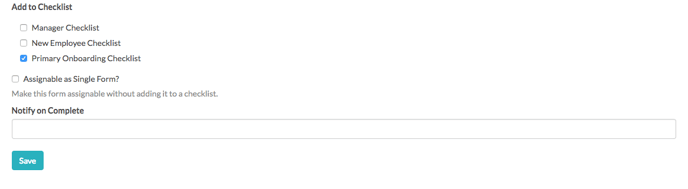
When you create a new form, at the bottom of the page you can select which checklist (if any) you’d like to add the form to.
### Add a form to a checklist by editing the checklist
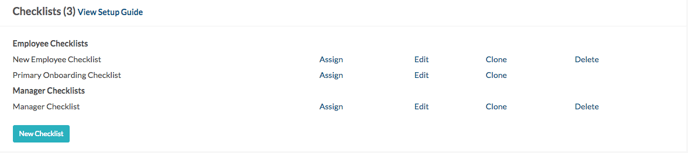
On the Onboarding side of the system, navigate to your **Settings** page (**Account \> Settings**). In the Checklist section, click on the **Edit** link next to the Checklist.
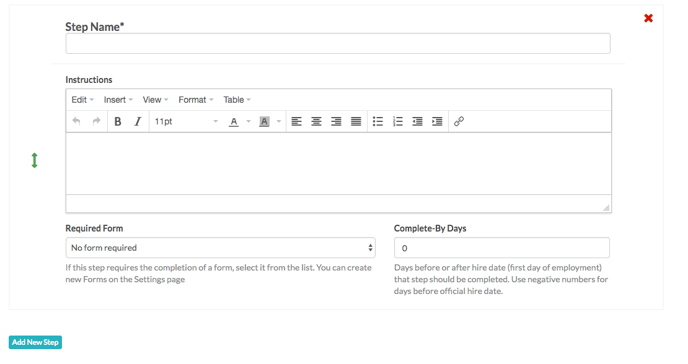
Scroll to the bottom of the checklist and click the **Add New Step** button.
Select the form you wish to add from the drop-down menu that appears for the new checklist step. When you add a form, you can add a deadline by completing the Complete By Days field. Add as many steps as you want by clicking the **Add New Step** button.
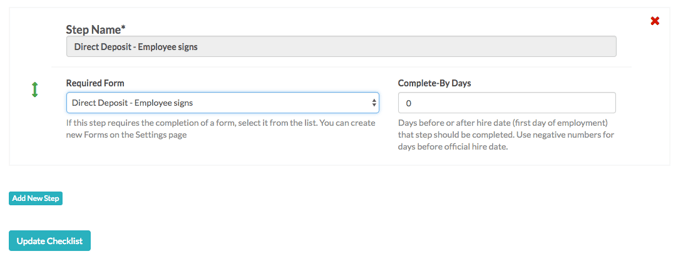
Click **Update Checklist** when you're done.
- [Troubleshooting](https://support.careerplug.com/troubleshooting?hsLang=en#main-content)
- [Contacting Support](https://support.careerplug.com/troubleshooting?hsLang=en#contacting-support)
- [Top Support Issues](https://support.careerplug.com/troubleshooting?hsLang=en#top-support-issues)
- [Video Library](https://support.careerplug.com/troubleshooting?hsLang=en#video-library)
- [Account](https://support.careerplug.com/account?hsLang=en#main-content)
- [Billing](https://support.careerplug.com/account?hsLang=en#billing)
- [Account Management](https://support.careerplug.com/account?hsLang=en#account-management)
- [Account Configuration](https://support.careerplug.com/account?hsLang=en#account-configuration)
- [Notifications](https://support.careerplug.com/account?hsLang=en#notifications)
- [Getting Started](https://support.careerplug.com/account?hsLang=en#getting-started)
- [What's New?](https://support.careerplug.com/whats-new?hsLang=en#main-content)
- [Monthly Updates](https://support.careerplug.com/whats-new?hsLang=en#monthly-updates)
- [Announcements](https://support.careerplug.com/whats-new?hsLang=en#announcements)
- [Attract: Job Postings](https://support.careerplug.com/attract-job-postings?hsLang=en#main-content)
- [Hiring Process](https://support.careerplug.com/attract-job-postings?hsLang=en#hiring-process)
- [New Job Postings](https://support.careerplug.com/attract-job-postings?hsLang=en#new-job-postings)
- [Existing Job Postings](https://support.careerplug.com/attract-job-postings?hsLang=en#existing-job-postings)
- [Attract: Targeted Recruiting](https://support.careerplug.com/attract-targeted-recruiting?hsLang=en#main-content)
- [Careers Page](https://support.careerplug.com/attract-targeted-recruiting?hsLang=en#careers-page)
- [Job Boards](https://support.careerplug.com/attract-targeted-recruiting?hsLang=en#job-boards)
- [Additional Sources](https://support.careerplug.com/attract-targeted-recruiting?hsLang=en#additional-sources)
- [Evaluate: Communication](https://support.careerplug.com/evaluate-communication?hsLang=en#main-content)
- [Applicant Management](https://support.careerplug.com/evaluate-communication?hsLang=en#applicant-management)
- [Applicant Tracking](https://support.careerplug.com/evaluate-communication?hsLang=en#applicant-tracking)
- [Messages](https://support.careerplug.com/evaluate-communication?hsLang=en#messages)
- [Contacting Applicants](https://support.careerplug.com/evaluate-communication?hsLang=en#contacting-applicants)
- [Evaluate: Interviews](https://support.careerplug.com/evaluate-interviews?hsLang=en#main-content)
- [Pre-Interview](https://support.careerplug.com/evaluate-interviews?hsLang=en#pre-interview)
- [Post-Interview](https://support.careerplug.com/evaluate-interviews?hsLang=en#post-interview)
- [Assessments](https://support.careerplug.com/evaluate-interviews?hsLang=en#assessments)
- [Onboard: New Hires](https://support.careerplug.com/onboard-new-hires?hsLang=en#main-content)
- [Making Your Hire](https://support.careerplug.com/onboard-new-hires?hsLang=en#making-your-hire)
- [New Hire Assignments](https://support.careerplug.com/onboard-new-hires?hsLang=en#new-hire-assignments)
- [Employee Access](https://support.careerplug.com/onboard-new-hires?hsLang=en#employee-access)
- [Onboard: Management](https://support.careerplug.com/onboard-management?hsLang=en#main-content)
- [Onboarding Configuration (Classic)](https://support.careerplug.com/onboard-management?hsLang=en#onboarding-configuration-classic)
- [Checklists (Classic)](https://support.careerplug.com/onboard-management?hsLang=en#checklists-classic)
- [Completed Onboarding](https://support.careerplug.com/onboard-management?hsLang=en#completed-onboarding)
- [Engage: Existing Employees](https://support.careerplug.com/engage-existing-employees?hsLang=en#main-content)
- [Integrations](https://support.careerplug.com/engage-existing-employees?hsLang=en#integrations)
- [Employer Forms](https://support.careerplug.com/engage-existing-employees?hsLang=en#employer-forms)
- [Employee Retention](https://support.careerplug.com/engage-existing-employees?hsLang=en#employee-retention)
- [Engage: Reporting](https://support.careerplug.com/engage-reporting?hsLang=en#main-content)
- [Charts](https://support.careerplug.com/engage-reporting?hsLang=en#charts)
- [Reporting](https://support.careerplug.com/engage-reporting?hsLang=en#reporting)
- [Compliance](https://support.careerplug.com/engage-reporting?hsLang=en#compliance)
- [Marketplace](https://support.careerplug.com/marketplace?hsLang=en)
[](https://support.careerplug.com?hsLang=en)
Handcrafted in Austin, Texas
© 2026 CareerPlug. All rights reserved.