---
title: January 2026 Product Updates
description: Tap into your best hiring source with Employee Referrals! November product updates include automated referral tracking, interview scheduling link, and a whole lot of improvements!
---
[Skip to content](https://support.careerplug.com/january-2026-product-updates#main-content)
[Submit a Request](https://support.careerplug.com/kb-tickets/new?hsLang=en)
[![CareerPlug-Logo-2025.png\]](https://support.careerplug.com/hs-fs/hubfs/CareerPlug-Logo-2025.png?width=230&height=40&name=CareerPlug-Logo-2025.png)](https://support.careerplug.com?hsLang=en)
Open main navigation
Close main navigation
- [Submit a Request](https://support.careerplug.com/kb-tickets/new)
- [Get help now!](https://support.careerplug.com/help)
[Get help now!](https://support.careerplug.com/help?hsLang=en)
How can we help?
- There are no suggestions because the search field is empty.
1. [Help Center](https://support.careerplug.com/?hsLang=en)
2. [What's New?](https://support.careerplug.com/whats-new?hsLang=en)
3. [Monthly Updates](https://support.careerplug.com/whats-new?hsLang=en#monthly-updates)
# January 2026 Product Updates
## This month's updates are all about clarity, focus, and organization.
From a redesigned dashboard that helps you see what needs your attention to visual tools that help you organize and tag applicants, we're making it easier to stay on top of your hiring and employee retention.
Not all features are available on every CareerPlug plan. Each description below indicates which plans include access.
**Not sure which plan you’re on?** Visit the [Plan and Billing](https://app.careerplug.com/manage/settings?tab=plan-and-billing) page inside your CareerPlug account or contact an [Admin user](https://support.careerplug.com/changing-a-users-access-level-permissions?hsLang=en).
- [Applicant board view](https://support.careerplug.com/january-2026-product-updates#app-board-view)
- [Applicant tagging](https://support.careerplug.com/january-2026-product-updates#app-tagging)
- [New dashboard tiles](https://support.careerplug.com/january-2026-product-updates#dashboard-tiles)
### Applicant board view
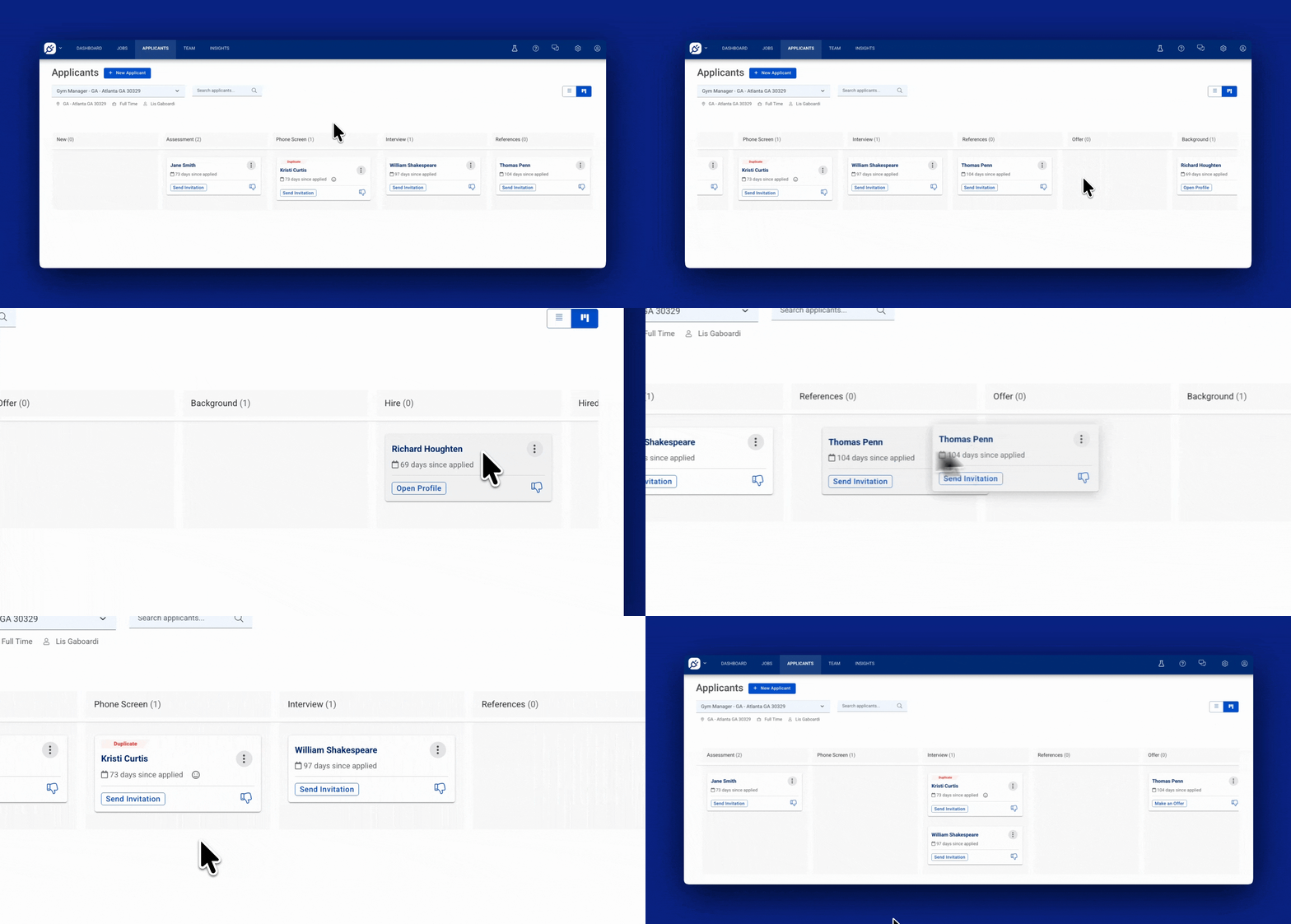
View all applicants at once and easily move them around! Drag and drop applicants between stages, spot bottlenecks instantly, and get a clearer picture of where everyone stands. It’s cleaner, easier to understand, and will help you stay organized even with a lot of applicants!
[Switch to the Applicant board view in your CareerPlug account.](https://app.careerplug.com/manage/apps/card_view)
This feature is available for CareerPlug accounts with a [Hire](https://support.careerplug.com/benefits-of-a-careerplug-hire-subscription?hsLang=en) or [Grow](https://support.careerplug.com/benefits-of-a-careerplug-grow-subscription?hsLang=en) plan subscription.
### Applicant tagging
Organize candidates your way with custom tags. Add tags like "Strong Culture Fit," "Needs Follow-Up," or "Seasonal Rehire" directly to any applicant — no setup or configuration needed.
As your applicant volume grows, tags help you (and your team) stay organized and add quick context that complements your existing comments and hiring stages. This is especially valuable for multi-location teams or when multiple people are reviewing candidates and need to collaborate.
[Start tagging applicants in your CareerPlug account.](https://app.careerplug.com/manage/apps?page=1&status=qualified)
This feature is available for CareerPlug accounts with a [Hire](https://support.careerplug.com/benefits-of-a-careerplug-hire-subscription?hsLang=en) or [Grow](https://support.careerplug.com/benefits-of-a-careerplug-grow-subscription?hsLang=en) plan subscription.
#### %20(Add%20and%20remove%20app%20tags%20GIF).gif?width=670&height=297&name=Applicants%20page%20(2.2.26)%20(Add%20and%20remove%20app%20tags%20GIF).gif)
### New dashboard tiles
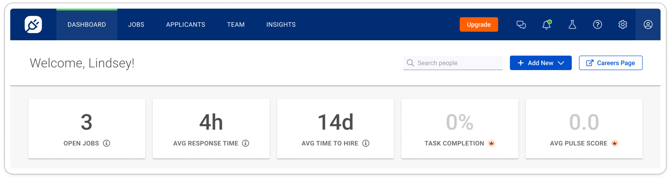
Your dashboard is now the central place for your hiring and retention success! See exactly what needs your attention – from time-to-contact applicants to average Employee Pulse Survey ratings. No more searching to figure out what to do. Just open your dashboard and get to work on what matters.
This feature is available for CareerPlug accounts with a [Limited](https://support.careerplug.com/benefits-of-a-careerplug-limited-subscription?hsLang=en), [Hire](https://support.careerplug.com/benefits-of-a-careerplug-hire-subscription?hsLang=en), or [Grow](https://support.careerplug.com/benefits-of-a-careerplug-grow-subscription?hsLang=en) plan subscription.
### ****
### Bugs that have been fixed over the last 30 days
We’ve been fine-tuning CareerPlug to ensure a smoother experience for you! Here are some of the key fixes we’ve made this month.
- **Job activity shows accurate clicks** – Click counts from job boards now display correctly instead of showing zero.
- **Columns line up on Jobs page** – Limited Access users now see properly aligned columns.
- **No more duplicate Indeed postings** – Fixed the issue where one active job would appear twice on Indeed (only a handful of clients were impacted by this).
- **Quick jump to hiring process settings** – A new link from the Hiring Process selector takes you straight to where you can view, edit, or add processes.
- **Partner processes clearly labeled** – Hiring processes from your franchisor now show a "Franchisor Provided" tag so you know where they came from.
- **Reschedule button works on mobile** – You can now reschedule non-Autopilot interviews from your phone without the button freezing.
- **Applicant replies show up** – Interview invitation responses from applicants now appear as expected.
- **Edit Locations goes to the right place** – Full Access users clicking "Edit Locations" in the job builder now see the location editor instead of the dashboard.
- **Full Access users can be added to jobs** – Fixed the issue preventing you from adding Full Access users to job postings even when they had the right location access.
- **Bulk dropdown stays visible** – The dropdown menu now stays on screen when making bulk assignments on the Team page.
- **Employee Pulse Surveys display properly at 100% zoom** – Text no longer overlaps so you can read everything clearly when zoomed in on mobile.
- **Employee Pulse Survey category ratings show correctly in PartnerHub** – Employee Pulse Survey question ratings now display as they should.
- **Classic Reports have scroll bars** – You can now scroll through all columns in your Applicant Detail Reports.
### Share your thoughts!
We’re constantly working to make CareerPlug better for you, and your feedback is essential to making that happen!
If you’d like to schedule time with our Product team to provide feedback on CareerPlug, please [schedule time with us here](https://share.hsforms.com/1QfeqyomUTjS3V37QeSz8kQ45iu0).
- [Troubleshooting](https://support.careerplug.com/troubleshooting?hsLang=en#main-content)
- [Contacting Support](https://support.careerplug.com/troubleshooting?hsLang=en#contacting-support)
- [Top Support Issues](https://support.careerplug.com/troubleshooting?hsLang=en#top-support-issues)
- [Video Library](https://support.careerplug.com/troubleshooting?hsLang=en#video-library)
- [Account](https://support.careerplug.com/account?hsLang=en#main-content)
- [Billing](https://support.careerplug.com/account?hsLang=en#billing)
- [Account Management](https://support.careerplug.com/account?hsLang=en#account-management)
- [Account Configuration](https://support.careerplug.com/account?hsLang=en#account-configuration)
- [Notifications](https://support.careerplug.com/account?hsLang=en#notifications)
- [Getting Started](https://support.careerplug.com/account?hsLang=en#getting-started)
- [What's New?](https://support.careerplug.com/whats-new?hsLang=en#main-content)
- [Monthly Updates](https://support.careerplug.com/whats-new?hsLang=en#monthly-updates)
- [Announcements](https://support.careerplug.com/whats-new?hsLang=en#announcements)
- [Attract: Job Postings](https://support.careerplug.com/attract-job-postings?hsLang=en#main-content)
- [Hiring Process](https://support.careerplug.com/attract-job-postings?hsLang=en#hiring-process)
- [New Job Postings](https://support.careerplug.com/attract-job-postings?hsLang=en#new-job-postings)
- [Existing Job Postings](https://support.careerplug.com/attract-job-postings?hsLang=en#existing-job-postings)
- [Attract: Targeted Recruiting](https://support.careerplug.com/attract-targeted-recruiting?hsLang=en#main-content)
- [Careers Page](https://support.careerplug.com/attract-targeted-recruiting?hsLang=en#careers-page)
- [Job Boards](https://support.careerplug.com/attract-targeted-recruiting?hsLang=en#job-boards)
- [Additional Sources](https://support.careerplug.com/attract-targeted-recruiting?hsLang=en#additional-sources)
- [Evaluate: Communication](https://support.careerplug.com/evaluate-communication?hsLang=en#main-content)
- [Applicant Management](https://support.careerplug.com/evaluate-communication?hsLang=en#applicant-management)
- [Applicant Tracking](https://support.careerplug.com/evaluate-communication?hsLang=en#applicant-tracking)
- [Messages](https://support.careerplug.com/evaluate-communication?hsLang=en#messages)
- [Contacting Applicants](https://support.careerplug.com/evaluate-communication?hsLang=en#contacting-applicants)
- [Evaluate: Interviews](https://support.careerplug.com/evaluate-interviews?hsLang=en#main-content)
- [Pre-Interview](https://support.careerplug.com/evaluate-interviews?hsLang=en#pre-interview)
- [Post-Interview](https://support.careerplug.com/evaluate-interviews?hsLang=en#post-interview)
- [Assessments](https://support.careerplug.com/evaluate-interviews?hsLang=en#assessments)
- [Onboard: New Hires](https://support.careerplug.com/onboard-new-hires?hsLang=en#main-content)
- [Making Your Hire](https://support.careerplug.com/onboard-new-hires?hsLang=en#making-your-hire)
- [New Hire Assignments](https://support.careerplug.com/onboard-new-hires?hsLang=en#new-hire-assignments)
- [Employee Access](https://support.careerplug.com/onboard-new-hires?hsLang=en#employee-access)
- [Onboard: Management](https://support.careerplug.com/onboard-management?hsLang=en#main-content)
- [Onboarding Configuration (Classic)](https://support.careerplug.com/onboard-management?hsLang=en#onboarding-configuration-classic)
- [Checklists (Classic)](https://support.careerplug.com/onboard-management?hsLang=en#checklists-classic)
- [Completed Onboarding](https://support.careerplug.com/onboard-management?hsLang=en#completed-onboarding)
- [Engage: Existing Employees](https://support.careerplug.com/engage-existing-employees?hsLang=en#main-content)
- [Integrations](https://support.careerplug.com/engage-existing-employees?hsLang=en#integrations)
- [Employer Forms](https://support.careerplug.com/engage-existing-employees?hsLang=en#employer-forms)
- [Employee Retention](https://support.careerplug.com/engage-existing-employees?hsLang=en#employee-retention)
- [Engage: Reporting](https://support.careerplug.com/engage-reporting?hsLang=en#main-content)
- [Charts](https://support.careerplug.com/engage-reporting?hsLang=en#charts)
- [Reporting](https://support.careerplug.com/engage-reporting?hsLang=en#reporting)
- [Compliance](https://support.careerplug.com/engage-reporting?hsLang=en#compliance)
- [Marketplace](https://support.careerplug.com/marketplace?hsLang=en)
[](https://support.careerplug.com?hsLang=en)
Handcrafted in Austin, Texas
© 2026 CareerPlug. All rights reserved.