---
title: myCNAjobs Integration
description: Learn how to connect CareerPlug with myCNAjobs to post unlimited CNA, HHA, and caregiver jobs, access resumes, sync candidates automatically, and track hires.
---
[Skip to content](https://support.careerplug.com/mycnajobs-integration#main-content)
[Submit a Request](https://support.careerplug.com/kb-tickets/new?hsLang=en)
[![CareerPlug-Logo-2025.png\]](https://support.careerplug.com/hs-fs/hubfs/CareerPlug-Logo-2025.png?width=230&height=40&name=CareerPlug-Logo-2025.png)](https://support.careerplug.com?hsLang=en)
Open main navigation
Close main navigation
- [Submit a Request](https://support.careerplug.com/kb-tickets/new)
- [Get help now!](https://support.careerplug.com/help)
[Get help now!](https://support.careerplug.com/help?hsLang=en)
How can we help?
- There are no suggestions because the search field is empty.
1. [Help Center](https://support.careerplug.com/?hsLang=en)
2. [Marketplace](https://support.careerplug.com/marketplace?hsLang=en)
# myCNAjobs Integration
Available with a CareerPlug [Grow](https://support.careerplug.com/benefits-of-a-careerplug-grow-subscription?hsLang=en) subscription.
myCNAjobs is the nation’s largest career community that job seekers use to find positions as Caregivers, Certified Nursing Assistants (CNAs), and Home Health Aides (HHAs). CareerPlug clients in the home health care industry can tap into this career community via a seamless integration. To enable the integration, subscribers must have an active paid subscription to both CareerPlug and myCNAjobs.
#### The myCNAjobs integration, once enabled, includes:
- Unlimited job postings to myCNAjobs' caregiver network. When you post a job in CareerPlug, it will be automatically posted to myCNAjobs. Candidates who apply through myCNAjobs will appear in CareerPlug, making it easy to manage all of your applicants from one place.
- myCNAjobs resume marketplace access, including 1-click resume syncing with CareerPlug.
### How do I enable the integration?
##### If you already have a myCNAjobs account:
1\. Contact your myCNAjobs account representative to enable the CareerPlug integration.
##### If you do not have a myCNAjobs account:
1. Sign into CareerPlug.
2\. [Click here](https://www.google.com/url?q=https://app.careerplug.com/manage/settings/cp_market_place/account_integrations/start?slug%3Dmycna&sa=D&source=docs&ust=1770152248712224&usg=AOvVaw3mYgs3GwMmYZFP7tJOeFjW) to be redirected to the myCNAjobs marketplace listing in your CareerPlug account.
You can also find the page above in CareerPlug by navigating to **Settings (gear icon) \> Cp Market Place \> Account Integrations**.
3\. Activate the myCNAjobs subscription and follow the prompts to enable the integration for your account.
4\. [Post jobs in your CareerPlug account](https://support.careerplug.com/posting-a-job?hsLang=en). All Caregiver, CNA, and HHA jobs will be automatically sent to myCNAjobs.
Interested in integrating other operational tools with your CareerPlug account? [Learn more](https://support.careerplug.com/careerplug-integrations?hsLang=en) about how CareerPlug can help you hire, onboard, and retain winning teams.
### Viewing your applicants from myCNAjobs
Applicants who applied via myCNAjobs will have **MyCNAJobs** listed as their source in CareerPlug.
##### To view the source from which an individual candidate applied:
1\. Navigate to your **Applicants** page in CareerPlug.
%20(NavEXP)%20(Standard)%20(Cropped%2c%20pointed%20to%20applicants).png?width=670&height=199&name=Dashboard%20(6.9.26)%20(NavEXP)%20(Standard)%20(Cropped%2c%20pointed%20to%20applicants).png)
2\. Click the applicant’s name.
%20(Nav%20bar%20minimized)%20Pointed%20to%20applicant%20profile%2c%20cropped.png?width=670&height=248&name=Applicants%20page%20(6.23.26)%20(Nav%20bar%20minimized)%20Pointed%20to%20applicant%20profile%2c%20cropped.png)
The source of their application will appear among the information under their name.
%20(myCNAjobs)%20(highlight).png?width=451&height=329&name=Applicant%20profile%20page%20(2.3.26)%20(myCNAjobs)%20(highlight).png)
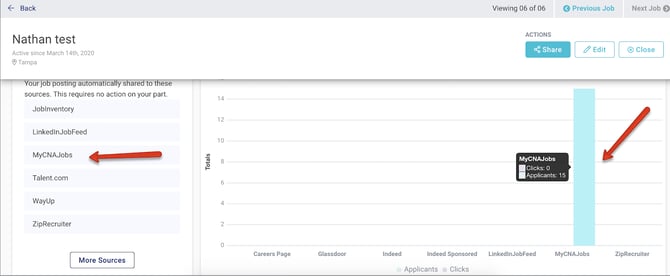
##### To view the number of applicants you’ve received from myCNAjobs for an individual job:
1\. Navigate to your **Jobs** page in CareerPlug.
2\. Click the job title.
3\. Scroll to the Source Conversion Performance chart at the bottom of the page.
4\. Click the **View More Sources** button in the top-right corner of the Source Conversion Performance chart.
5\. In the Select Applicant Sources drawer, turn on the **MyCNAJobs** toggle (if not already on).
6\. Click the **Apply** button in the bottom-right corner of the drawer.

You can now compare the applicant flow from myCNAjobs with other sources.
##### To view the number of applicants you’ve received from myCNAjobs across your entire account:
1\. Navigate to your **Insights** page in CareerPlug.
%20(NavEXP)%20(Standard)%20Hiring%20Insights.png?width=670&height=303&name=Dashboard%20(6.9.26)%20(NavEXP)%20(Standard)%20Hiring%20Insights.png)
2\. Scroll down to the **Source Analysis** section.
%20Insights%2c%20Source%20Analysis%20Highlighted.png?width=670&height=293&name=Hiring%20Insights%2c%20Source%20Analysis%20Chart%20(Nav%20Bar%20Minimized)%20Insights%2c%20Source%20Analysis%20Highlighted.png)
You can also find a [source analysis chart](https://support.careerplug.com/using-the-source-analysis-chart?hsLang=en) in [Classic Reports](https://support.careerplug.com/using-classic-reports?hsLang=en).
### What are MyCNAJobs Match candidates?
myCNAjobs uses ARIA AI to match top-qualified candidates with your myCNAjobs job postings. An ARIA AI matched candidate is different from an organic applicant who's applied to one of your posted jobs.
ARIA AI matches are intelligent caregiver recommendations delivered automatically to your CareerPlug account. ARIA helps you reach additional qualified caregivers from the myCNAjobs network, accelerating your hiring process and expanding your talent pool.
#### How do I tell the difference between organic applicants and MyCNAJobs Match candidates?
An ARIA AI matched candidate will have **MyCNAJobs Match** listed as their source in CareerPlug instead of **MyCNAJobs**.
%20(myCNAjobs%20Match)%20(highlight).png?width=670&height=309&name=Applicant%20profile%20page%20(2.3.26)%20(myCNAjobs%20Match)%20(highlight).png)
#### How do I manage MyCNAJobs Match candidates?
**ARIA AI matched candidates have not applied to your job posting.** When you contact them, you’ll want to start the conversation by identifying that they were matched to one of your job postings by myCNAjobs, and you're reaching out to discuss the opportunity.
- [Troubleshooting](https://support.careerplug.com/troubleshooting?hsLang=en#main-content)
- [Contacting Support](https://support.careerplug.com/troubleshooting?hsLang=en#contacting-support)
- [Top Support Issues](https://support.careerplug.com/troubleshooting?hsLang=en#top-support-issues)
- [Video Library](https://support.careerplug.com/troubleshooting?hsLang=en#video-library)
- [Account](https://support.careerplug.com/account?hsLang=en#main-content)
- [Billing](https://support.careerplug.com/account?hsLang=en#billing)
- [Account Management](https://support.careerplug.com/account?hsLang=en#account-management)
- [Account Configuration](https://support.careerplug.com/account?hsLang=en#account-configuration)
- [Notifications](https://support.careerplug.com/account?hsLang=en#notifications)
- [Getting Started](https://support.careerplug.com/account?hsLang=en#getting-started)
- [What's New?](https://support.careerplug.com/whats-new?hsLang=en#main-content)
- [Monthly Updates](https://support.careerplug.com/whats-new?hsLang=en#monthly-updates)
- [Announcements](https://support.careerplug.com/whats-new?hsLang=en#announcements)
- [Attract: Job Postings](https://support.careerplug.com/attract-job-postings?hsLang=en#main-content)
- [Hiring Process](https://support.careerplug.com/attract-job-postings?hsLang=en#hiring-process)
- [New Job Postings](https://support.careerplug.com/attract-job-postings?hsLang=en#new-job-postings)
- [Existing Job Postings](https://support.careerplug.com/attract-job-postings?hsLang=en#existing-job-postings)
- [Attract: Targeted Recruiting](https://support.careerplug.com/attract-targeted-recruiting?hsLang=en#main-content)
- [Careers Page](https://support.careerplug.com/attract-targeted-recruiting?hsLang=en#careers-page)
- [Job Boards](https://support.careerplug.com/attract-targeted-recruiting?hsLang=en#job-boards)
- [Additional Sources](https://support.careerplug.com/attract-targeted-recruiting?hsLang=en#additional-sources)
- [Evaluate: Communication](https://support.careerplug.com/evaluate-communication?hsLang=en#main-content)
- [Applicant Management](https://support.careerplug.com/evaluate-communication?hsLang=en#applicant-management)
- [Applicant Tracking](https://support.careerplug.com/evaluate-communication?hsLang=en#applicant-tracking)
- [Messages](https://support.careerplug.com/evaluate-communication?hsLang=en#messages)
- [Contacting Applicants](https://support.careerplug.com/evaluate-communication?hsLang=en#contacting-applicants)
- [Evaluate: Interviews](https://support.careerplug.com/evaluate-interviews?hsLang=en#main-content)
- [Pre-Interview](https://support.careerplug.com/evaluate-interviews?hsLang=en#pre-interview)
- [Post-Interview](https://support.careerplug.com/evaluate-interviews?hsLang=en#post-interview)
- [Assessments](https://support.careerplug.com/evaluate-interviews?hsLang=en#assessments)
- [Onboard: New Hires](https://support.careerplug.com/onboard-new-hires?hsLang=en#main-content)
- [Making Your Hire](https://support.careerplug.com/onboard-new-hires?hsLang=en#making-your-hire)
- [New Hire Assignments](https://support.careerplug.com/onboard-new-hires?hsLang=en#new-hire-assignments)
- [Employee Access](https://support.careerplug.com/onboard-new-hires?hsLang=en#employee-access)
- [Onboard: Management](https://support.careerplug.com/onboard-management?hsLang=en#main-content)
- [Onboarding Configuration (Classic)](https://support.careerplug.com/onboard-management?hsLang=en#onboarding-configuration-classic)
- [Checklists (Classic)](https://support.careerplug.com/onboard-management?hsLang=en#checklists-classic)
- [Completed Onboarding](https://support.careerplug.com/onboard-management?hsLang=en#completed-onboarding)
- [Engage: Existing Employees](https://support.careerplug.com/engage-existing-employees?hsLang=en#main-content)
- [Integrations](https://support.careerplug.com/engage-existing-employees?hsLang=en#integrations)
- [Employer Forms](https://support.careerplug.com/engage-existing-employees?hsLang=en#employer-forms)
- [Employee Retention](https://support.careerplug.com/engage-existing-employees?hsLang=en#employee-retention)
- [Engage: Reporting](https://support.careerplug.com/engage-reporting?hsLang=en#main-content)
- [Charts](https://support.careerplug.com/engage-reporting?hsLang=en#charts)
- [Reporting](https://support.careerplug.com/engage-reporting?hsLang=en#reporting)
- [Compliance](https://support.careerplug.com/engage-reporting?hsLang=en#compliance)
- [Marketplace](https://support.careerplug.com/marketplace?hsLang=en)
[](https://support.careerplug.com?hsLang=en)
Handcrafted in Austin, Texas
© 2026 CareerPlug. All rights reserved.