---
title: Sharing jobs to Handshake to attract and hire college students
description: Learn how to use a custom source to share your CareerPlug jobs to Handshake, the job board designed specifically for college students.
---
[Skip to content](https://support.careerplug.com/sharing-jobs-to-handshake-to-attract-and-hire-college-students#main-content)
[Submit a Request](https://support.careerplug.com/kb-tickets/new?hsLang=en)
[![CareerPlug-Logo-2025.png\]](https://support.careerplug.com/hs-fs/hubfs/CareerPlug-Logo-2025.png?width=230&height=40&name=CareerPlug-Logo-2025.png)](https://support.careerplug.com?hsLang=en)
Open main navigation
Close main navigation
- [Submit a Request](https://support.careerplug.com/kb-tickets/new)
- [Get help now!](https://support.careerplug.com/help)
[Get help now!](https://support.careerplug.com/help?hsLang=en)
How can we help?
- There are no suggestions because the search field is empty.
1. [Help Center](https://support.careerplug.com/?hsLang=en)
2. [Attract: Targeted Recruiting](https://support.careerplug.com/attract-targeted-recruiting?hsLang=en)
3. [Additional Sources](https://support.careerplug.com/attract-targeted-recruiting?hsLang=en#additional-sources)
# Sharing jobs to Handshake to attract and hire college students
## Handshake is the job board designed specifically for college students.
If college students are your ideal candidates — for instance, if you're recruiting for positions in early childhood education or youth enrichment — we recommend sharing your CareerPlug job postings to [Handshake](https://joinhandshake.com/).
To share your jobs to Handshake so that applicants appear in your CareerPlug account, you need to create Handshake as a [custom source](https://support.careerplug.com/creating-a-custom-source?hsLang=en) and then associate that custom source URL with a Handshake job posting.
[CareerPlug automatically shares your jobs with our partner job boards](https://support.careerplug.com/job-boards-where-careerplug-automatically-sends-your-jobs?hsLang=en), but we strongly recommend [sharing jobs to custom sources](https://support.careerplug.com/sharing-jobs-to-custom-sources?hsLang=en) to diversify your applicant pool and attract more high-quality applicants.
##### In this article:
- [How do I create Handshake as a custom source in CareerPlug?](https://support.careerplug.com/sharing-jobs-to-handshake-to-attract-and-hire-college-students#create-custom-source)
- [How do I associate my custom source URL with a Handshake job posting?](https://support.careerplug.com/sharing-jobs-to-handshake-to-attract-and-hire-college-students#associate-custom-source-URL)
### How do I create Handshake as a custom source in CareerPlug?
Available with a CareerPlug [Hire](https://support.careerplug.com/benefits-of-your-careerplug-hire-subscription?hsLang=en) or [Grow](https://support.careerplug.com/benefits-of-a-careerplug-grow-subscription?hsLang=en) subscription.
1\. In your CareerPlug account, navigate to **Settings (gear icon) \> Hiring Tools \> Custom Sources**.
2\. Click the **plus (+) icon** to create a new custom source.
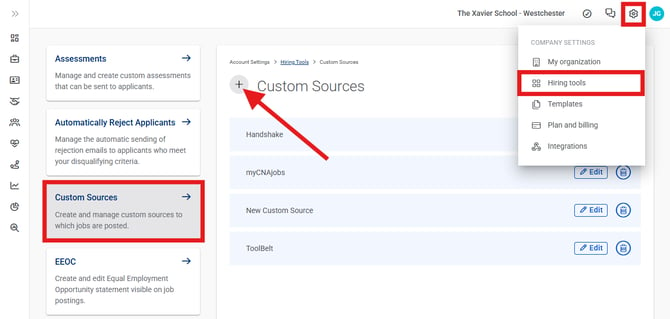
3\. In the Add Custom Source drawer, enter "Handshake" as the title for your custom source in the open field.
If you'd like to link your custom source to your careers page instead of linking it to a single job posting, turn on the **This is a Careers Page source** toggle. Use this option to advertise your company and all of your jobs as a whole.
4\. Click the **Save** button.

5\. Navigate to your **Jobs** page.
6\. Click the **three-dots icon** to the right of whichever job you want to share to Handshake and select **Share** from the drop-down menu.

7\. In the Share Job pop-up window, scroll down and click the **Track Custom Sources** tile.

8\. In the Custom Sources drawer, click the **Copy** button to the right of Handshake and select **Copy link** from the drop-down menu.

With your Handshake custom source tracking URL copied, it's time to sign in to Handshake and post your job.
### How do I associate my custom source tracking URL with a Handshake job posting?
**Note:** You need to [register for a Handshake](https://app.joinhandshake.com/employer_registrations/new) account before you can post jobs there.
1\. [In your Handshake account](https://support.joinhandshake.com/hc/en-us/articles/360004317153-How-to-Use-Direct-ATS), click the **Jobs** tab in the left navigation bar.

2\. Click the **Create job** button in the upper-right corner of the page.

3\. Configure your job posting according to [Handshake's instructions](https://support.joinhandshake.com/hc/en-us/articles/218693198-How-to-Post-a-Job).
To save time, you can copy the job description from your CareerPlug job and reuse it for your Handshake posting. However, if you do this, make sure you have your CareerPlug account readily available so you can [copy your custom source tracking URL](https://support.careerplug.com/sharing-jobs-to-handshake-to-attract-and-hire-college-students#copy-custom-source-URL) for the next steps.
4\. When you reach the **Application process** page, click the **On a separate website** tile (under **How will candidates submit applications?**).
****
5\. Paste the link to your CareerPlug custom source tracking URL in the **External URL** field.
**Note:** Your External URL must begin with *http://* or *https://*.
6\. Enter any relevant **Instructions for applicants** in the open field (e.g., “Complete the full application” or “Attach a cover letter”).
7\. Click the **Continue** button at the bottom of the page and finish creating your Handshake job post according to [Handshake's instructions](https://support.joinhandshake.com/hc/en-us/articles/218693198-How-to-Post-a-Job).

For any additional assistance, [contact CareerPlug's Hiring Experts](https://support.careerplug.com/contacting-careerplug-support?hsLang=en).
- [Troubleshooting](https://support.careerplug.com/troubleshooting?hsLang=en#main-content)
- [Contacting Support](https://support.careerplug.com/troubleshooting?hsLang=en#contacting-support)
- [Top Support Issues](https://support.careerplug.com/troubleshooting?hsLang=en#top-support-issues)
- [Video Library](https://support.careerplug.com/troubleshooting?hsLang=en#video-library)
- [Account](https://support.careerplug.com/account?hsLang=en#main-content)
- [Billing](https://support.careerplug.com/account?hsLang=en#billing)
- [Account Management](https://support.careerplug.com/account?hsLang=en#account-management)
- [Account Configuration](https://support.careerplug.com/account?hsLang=en#account-configuration)
- [Notifications](https://support.careerplug.com/account?hsLang=en#notifications)
- [Getting Started](https://support.careerplug.com/account?hsLang=en#getting-started)
- [What's New?](https://support.careerplug.com/whats-new?hsLang=en#main-content)
- [Monthly Updates](https://support.careerplug.com/whats-new?hsLang=en#monthly-updates)
- [Announcements](https://support.careerplug.com/whats-new?hsLang=en#announcements)
- [Attract: Job Postings](https://support.careerplug.com/attract-job-postings?hsLang=en#main-content)
- [Hiring Process](https://support.careerplug.com/attract-job-postings?hsLang=en#hiring-process)
- [New Job Postings](https://support.careerplug.com/attract-job-postings?hsLang=en#new-job-postings)
- [Existing Job Postings](https://support.careerplug.com/attract-job-postings?hsLang=en#existing-job-postings)
- [Attract: Targeted Recruiting](https://support.careerplug.com/attract-targeted-recruiting?hsLang=en#main-content)
- [Careers Page](https://support.careerplug.com/attract-targeted-recruiting?hsLang=en#careers-page)
- [Job Boards](https://support.careerplug.com/attract-targeted-recruiting?hsLang=en#job-boards)
- [Additional Sources](https://support.careerplug.com/attract-targeted-recruiting?hsLang=en#additional-sources)
- [Evaluate: Communication](https://support.careerplug.com/evaluate-communication?hsLang=en#main-content)
- [Applicant Management](https://support.careerplug.com/evaluate-communication?hsLang=en#applicant-management)
- [Applicant Tracking](https://support.careerplug.com/evaluate-communication?hsLang=en#applicant-tracking)
- [Messages](https://support.careerplug.com/evaluate-communication?hsLang=en#messages)
- [Contacting Applicants](https://support.careerplug.com/evaluate-communication?hsLang=en#contacting-applicants)
- [Evaluate: Interviews](https://support.careerplug.com/evaluate-interviews?hsLang=en#main-content)
- [Pre-Interview](https://support.careerplug.com/evaluate-interviews?hsLang=en#pre-interview)
- [Post-Interview](https://support.careerplug.com/evaluate-interviews?hsLang=en#post-interview)
- [Assessments](https://support.careerplug.com/evaluate-interviews?hsLang=en#assessments)
- [Onboard: New Hires](https://support.careerplug.com/onboard-new-hires?hsLang=en#main-content)
- [Making Your Hire](https://support.careerplug.com/onboard-new-hires?hsLang=en#making-your-hire)
- [New Hire Assignments](https://support.careerplug.com/onboard-new-hires?hsLang=en#new-hire-assignments)
- [Employee Access](https://support.careerplug.com/onboard-new-hires?hsLang=en#employee-access)
- [Onboard: Management](https://support.careerplug.com/onboard-management?hsLang=en#main-content)
- [Onboarding Configuration (Classic)](https://support.careerplug.com/onboard-management?hsLang=en#onboarding-configuration-classic)
- [Checklists (Classic)](https://support.careerplug.com/onboard-management?hsLang=en#checklists-classic)
- [Completed Onboarding](https://support.careerplug.com/onboard-management?hsLang=en#completed-onboarding)
- [Engage: Existing Employees](https://support.careerplug.com/engage-existing-employees?hsLang=en#main-content)
- [Integrations](https://support.careerplug.com/engage-existing-employees?hsLang=en#integrations)
- [Employer Forms](https://support.careerplug.com/engage-existing-employees?hsLang=en#employer-forms)
- [Employee Retention](https://support.careerplug.com/engage-existing-employees?hsLang=en#employee-retention)
- [Engage: Reporting](https://support.careerplug.com/engage-reporting?hsLang=en#main-content)
- [Charts](https://support.careerplug.com/engage-reporting?hsLang=en#charts)
- [Reporting](https://support.careerplug.com/engage-reporting?hsLang=en#reporting)
- [Compliance](https://support.careerplug.com/engage-reporting?hsLang=en#compliance)
- [Marketplace](https://support.careerplug.com/marketplace?hsLang=en)
[](https://support.careerplug.com?hsLang=en)
Handcrafted in Austin, Texas
© 2026 CareerPlug. All rights reserved.