---
title: Using the job profile page
description: The job profile page is a great tool for evaluating how effective your hiring process is and how attractive your job is to applicants. This article will help you utilize this page to the fullest and improve your hiring process.
---
[Skip to content](https://support.careerplug.com/using-your-job-profile-page#main-content)
[Submit a Request](https://support.careerplug.com/kb-tickets/new?hsLang=en)
[![CareerPlug-Logo-2025.png\]](https://support.careerplug.com/hs-fs/hubfs/CareerPlug-Logo-2025.png?width=230&height=40&name=CareerPlug-Logo-2025.png)](https://support.careerplug.com?hsLang=en)
Open main navigation
Close main navigation
- [Submit a Request](https://support.careerplug.com/kb-tickets/new)
- [Get help now!](https://support.careerplug.com/help)
[Get help now!](https://support.careerplug.com/help?hsLang=en)
How can we help?
- There are no suggestions because the search field is empty.
1. [Help Center](https://support.careerplug.com/?hsLang=en)
2. [Attract: Job Postings](https://support.careerplug.com/attract-job-postings?hsLang=en)
3. [Existing Job Postings](https://support.careerplug.com/attract-job-postings?hsLang=en#existing-job-postings)
# Using the job profile page
The job profile page is a great tool for evaluating how effective your hiring process is and how attractive your job is to applicants. For example, you can use the Overview section to see how close you are to making a hire or the Source Conversion Performance chart to see your click-to-apply rate broken out by each source.
Watch this [three-minute video](https://www.loom.com/share/c06e014042b24a04aa6f470d6972431f) about using your job profile page, or follow along below.
### Your job profile page
On your **Jobs** page, click a job's title to view the job profile page.
%20Pointed%20to%20job%20title.png?width=670&height=251&name=Jobs%20Page%2c%20Active%20(Nav%20Bar%20Expanded)%20Pointed%20to%20job%20title.png)
At the top of the job profile page, you'll see a job's employment type (Full-Time, Part-Time, etc.), how long it's been active, when it was last modified, and its location. You also have quick access to [**Share**](https://support.careerplug.com/sharing-your-job-on-external-sources?hsLang=en), [**Edit**](https://support.careerplug.com/posting-a-job?hsLang=en#edit), or [**Close**](https://support.careerplug.com/removing-or-closing-a-job-posting?hsLang=en) the job from here.
%20(highlights).png?width=670&height=156&name=Job%20Profile%20Page%20(top)%20(highlights).png)
#### Overview
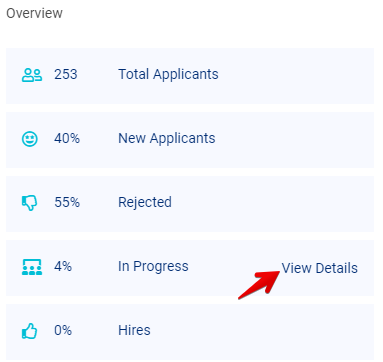
The Overview section provides an at-a-glance view of the number of applicants your job has received as well as where applicants are in the hiring process.
Click the **View Details** link to get more information about which hiring steps applicants are in.
Click the **Total Applicants**, **New Applicants**, **Rejected**, **In Progress**, or **Hires** links to navigate to the associated tab of your **Applicants** page.
#### Applicant Flow Summary
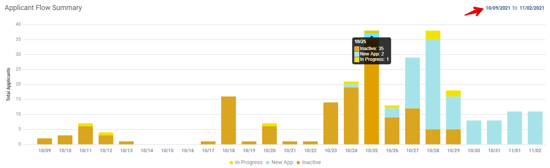
The Applicant Flow Summary charts a job’s monthly applicant flow, day by day. Hover over an individual bar for more details about the status of the job's applicants on that day. You can also adjust the date range (in the top right corner) to expand or shrink the scope of the graph’s data.
#### Recently Active Candidates
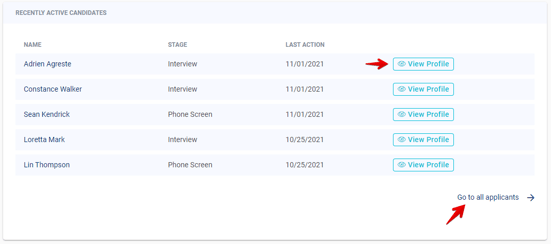
The Recently Active Candidates section lists the most recent applicants for the job, what hiring stage they are in, and when the last action was taken on their hiring process. Click the **View Profile** button to open an applicant’s profile or the **Go to all applicants** link to view all applicants for the job.
#### Activity
The Activity section lists the most recent activity taking place on the job, such as someone editing the job or contacting an applicant. Click the **View All** button to see the entire history of activity for the job.

#### Applicant Sources
The Applicant Sources section is split into two tabs:
- **Automatic Sources** - Lists all of the [job boards where CareerPlug automatically sends your jobs](https://support.careerplug.com/job-boards-where-careerplug-automatically-sends-your-jobs?hsLang=en).
- **Manual Share** - A list of additional sources where you can manually share your jobs to attract more high-quality applicants. Posting your job using these custom links allows you to track applicants coming from these sources.
- Click the **Share** button next to any social media platform to prompt a pop-up window that allows you to sign in and post your job to the chosen platform.
- Click the **Share Via Email** button to email a link to your job to a candidate.
- Click the **Share↓** button next to any custom sources you've created for the job and select **Copy link** or **Copy link with description** from the drop-down menu, depending on how much information you need to share.
- Click the **More Sources** button to open [the Share Job pop-up window](https://support.careerplug.com/sharing-your-job-on-external-sources?hsLang=en).
%20(Share%20drop-down)%20(Manual%20highlights).png?width=416&height=606&name=Job%20Profile%20Page%20(Applicant%20Sources)%20(Share%20drop-down)%20(Manual%20highlights).png)
#### Source Conversion Performance
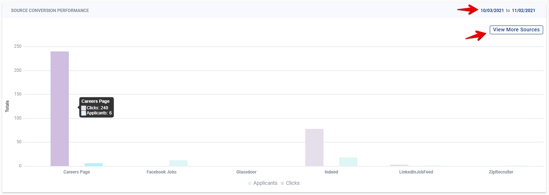
The Source Conversion Performance chart shows the number of applicants and job posting clicks per source, allowing you to see which of your sources are producing high numbers of clicks and/or applicants. Hovering over the bars will provide the exact number of applicants and clicks for that source.
You can adjust the date range (in the top right corner) to expand or shrink the scope of the graph’s data. You can also configure which sources are displayed on the graph by clicking the **View More Sources** button.
In the Select Applicant Sources drawer, toggle on any sources you want to see on the Source Conversion Performance chart, and click the **Apply** button to save.

The Source Conversion Performance chart is a great tool to evaluate [your applicant conversion rate](https://www.careerplug.com/blog/how-to-optimize-your-applicant-conversion-rate/), also know as your click-to-apply rate. Your applicant conversion is calculated by taking the number of applicants you receive for a job divided by the number of clicks you receive on your job from job seekers.
This number can tell you how many candidates are abandoning your job posting without applying. If, for instance, one of your job postings has received a lot of clicks but few applicants, you might have a problem with your job title (it's misleading), job description, or application requirements (unique sign ins, sensitive personal information, too many prescreen questions).
- [Troubleshooting](https://support.careerplug.com/troubleshooting?hsLang=en#main-content)
- [Contacting Support](https://support.careerplug.com/troubleshooting?hsLang=en#contacting-support)
- [Top Support Issues](https://support.careerplug.com/troubleshooting?hsLang=en#top-support-issues)
- [Video Library](https://support.careerplug.com/troubleshooting?hsLang=en#video-library)
- [Account](https://support.careerplug.com/account?hsLang=en#main-content)
- [Billing](https://support.careerplug.com/account?hsLang=en#billing)
- [Account Management](https://support.careerplug.com/account?hsLang=en#account-management)
- [Account Configuration](https://support.careerplug.com/account?hsLang=en#account-configuration)
- [Notifications](https://support.careerplug.com/account?hsLang=en#notifications)
- [Getting Started](https://support.careerplug.com/account?hsLang=en#getting-started)
- [What's New?](https://support.careerplug.com/whats-new?hsLang=en#main-content)
- [Monthly Updates](https://support.careerplug.com/whats-new?hsLang=en#monthly-updates)
- [Announcements](https://support.careerplug.com/whats-new?hsLang=en#announcements)
- [Attract: Job Postings](https://support.careerplug.com/attract-job-postings?hsLang=en#main-content)
- [Hiring Process](https://support.careerplug.com/attract-job-postings?hsLang=en#hiring-process)
- [New Job Postings](https://support.careerplug.com/attract-job-postings?hsLang=en#new-job-postings)
- [Existing Job Postings](https://support.careerplug.com/attract-job-postings?hsLang=en#existing-job-postings)
- [Attract: Targeted Recruiting](https://support.careerplug.com/attract-targeted-recruiting?hsLang=en#main-content)
- [Careers Page](https://support.careerplug.com/attract-targeted-recruiting?hsLang=en#careers-page)
- [Job Boards](https://support.careerplug.com/attract-targeted-recruiting?hsLang=en#job-boards)
- [Additional Sources](https://support.careerplug.com/attract-targeted-recruiting?hsLang=en#additional-sources)
- [Evaluate: Communication](https://support.careerplug.com/evaluate-communication?hsLang=en#main-content)
- [Applicant Management](https://support.careerplug.com/evaluate-communication?hsLang=en#applicant-management)
- [Applicant Tracking](https://support.careerplug.com/evaluate-communication?hsLang=en#applicant-tracking)
- [Messages](https://support.careerplug.com/evaluate-communication?hsLang=en#messages)
- [Contacting Applicants](https://support.careerplug.com/evaluate-communication?hsLang=en#contacting-applicants)
- [Evaluate: Interviews](https://support.careerplug.com/evaluate-interviews?hsLang=en#main-content)
- [Pre-Interview](https://support.careerplug.com/evaluate-interviews?hsLang=en#pre-interview)
- [Post-Interview](https://support.careerplug.com/evaluate-interviews?hsLang=en#post-interview)
- [Assessments](https://support.careerplug.com/evaluate-interviews?hsLang=en#assessments)
- [Onboard: New Hires](https://support.careerplug.com/onboard-new-hires?hsLang=en#main-content)
- [Making Your Hire](https://support.careerplug.com/onboard-new-hires?hsLang=en#making-your-hire)
- [New Hire Assignments](https://support.careerplug.com/onboard-new-hires?hsLang=en#new-hire-assignments)
- [Employee Access](https://support.careerplug.com/onboard-new-hires?hsLang=en#employee-access)
- [Onboard: Management](https://support.careerplug.com/onboard-management?hsLang=en#main-content)
- [Onboarding Configuration (Classic)](https://support.careerplug.com/onboard-management?hsLang=en#onboarding-configuration-classic)
- [Checklists (Classic)](https://support.careerplug.com/onboard-management?hsLang=en#checklists-classic)
- [Completed Onboarding](https://support.careerplug.com/onboard-management?hsLang=en#completed-onboarding)
- [Engage: Existing Employees](https://support.careerplug.com/engage-existing-employees?hsLang=en#main-content)
- [Integrations](https://support.careerplug.com/engage-existing-employees?hsLang=en#integrations)
- [Employer Forms](https://support.careerplug.com/engage-existing-employees?hsLang=en#employer-forms)
- [Employee Retention](https://support.careerplug.com/engage-existing-employees?hsLang=en#employee-retention)
- [Engage: Reporting](https://support.careerplug.com/engage-reporting?hsLang=en#main-content)
- [Charts](https://support.careerplug.com/engage-reporting?hsLang=en#charts)
- [Reporting](https://support.careerplug.com/engage-reporting?hsLang=en#reporting)
- [Compliance](https://support.careerplug.com/engage-reporting?hsLang=en#compliance)
- [Marketplace](https://support.careerplug.com/marketplace?hsLang=en)
[](https://support.careerplug.com?hsLang=en)
Handcrafted in Austin, Texas
© 2026 CareerPlug. All rights reserved.