---
title: Attracting better applicants with Achievements
description: To help responsive employers attract more qualified applicants, CareerPlug has introduced Achievements. This article will tell you all about them and how you can utilize Achievements to improve the quality and quantity of your applicants.
---
[Skip to content](https://support.careerplug.com/attracting-better-applicants-with-achievements#main-content)
[Submit a Request](https://support.careerplug.com/kb-tickets/new?hsLang=en)
[![CareerPlug-Logo-2025.png\]](https://support.careerplug.com/hs-fs/hubfs/CareerPlug-Logo-2025.png?width=230&height=40&name=CareerPlug-Logo-2025.png)](https://support.careerplug.com?hsLang=en)
Open main navigation
Close main navigation
- [Submit a Request](https://support.careerplug.com/kb-tickets/new)
- [Get help now!](https://support.careerplug.com/help)
[Get help now!](https://support.careerplug.com/help?hsLang=en)
How can we help?
- There are no suggestions because the search field is empty.
1. [Help Center](https://support.careerplug.com/?hsLang=en)
2. [Evaluate: Communication](https://support.careerplug.com/evaluate-communication?hsLang=en)
3. [Contacting Applicants](https://support.careerplug.com/evaluate-communication?hsLang=en#contacting-applicants)
# Attracting better applicants with Achievements
To help responsive employers attract more qualified applicants, CareerPlug has introduced Achievements. Contact the majority of your applicants quickly to collect Achievements and highlight your responsiveness and quick time-to-contact to future candidates.
### Responsiveness to applicants
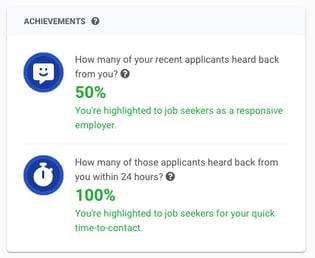
This achievement measures **how many applicants from the last 30 days you contacted**. Earning this shows potential candidates that your company makes an effort to review and follow up with a high percentage of applicants.
**Contact at least 50% of qualified applicants from the last 30 days** to earn an achievement that highlights your company as responsive to applicants.
****
### Quick time-to-contact
This achievement looks at all applicants you contacted in the last 30 days and measures **how many you contacted *within 24 hours***. Earning this shows potential candidates that your company is on top of reviewing new applicants quickly.
**Contact 100% of qualified applicants from the last 30 days *within 24 hours*** to earn an achievement that highlights your company as quick to respond to applicants.
****
**Note:** Weekends **are not** included when calculating the Quick time-to-contact achievement. If candidates apply on a Friday or over the weekend, your window to contact them will extend to the next business day.
### Displaying earned badges
Once you earn an Achievement, the badge will automatically display on any job posting on your CareerPlug careers page.

Your Achievements give applicants insight into your recruiting practices and show your commitment to an attentive and considerate hiring process, improving your employer brand.
**Achievements are calculated weekly based on the applicant activity in your CareerPlug account over the last 30 days**. This refreshes every **Sunday**.
Once earned, you must continue these responsive practices to maintain your Achievements. You can track your Achievement progress from your **Dashboard** in CareerPlug.
### What methods of contact count towards CareerPlug Achievements?
- [Sending an invitation or confirmation message](https://support.careerplug.com/inviting-an-applicant-to-an-interview?hsLang=en) (*email or text*) to an applicant for a phone screen or interview
%20GIF.gif?width=550&height=234&name=Send%20Interview%20Invite%20(non-AP)%20GIF.gif)
- [Using Autopilot](https://support.careerplug.com/scheduling-interviews-using-autopilot?hsLang=en) to send an invitation message (*email or text*) to an applicant for a phone screen or interview with just a couple clicks
%20GIF\).gif?width=550&height=234&name=Running%20Autopilot%20\(with%20Defaults\)%20GIF\).gif)
- Using the **Chat icon**/Contact drawer to send an informal message (*email or text*) to an applicant
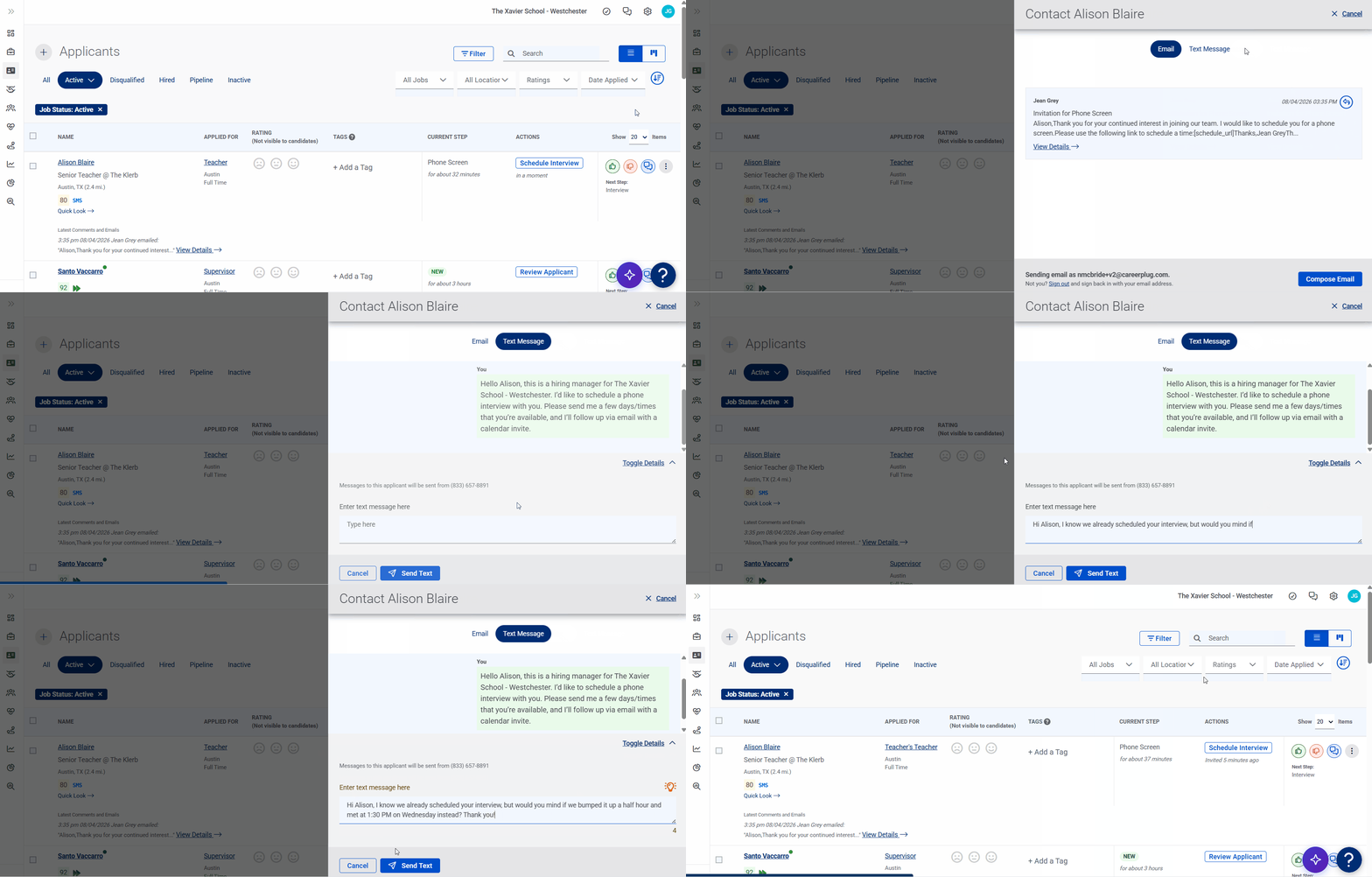
- [Deactivating an applicant](https://support.careerplug.com/deactivating-an-applicant?hsLang=en) who doesn't meet your criteria and [sending them a rejection email](https://support.careerplug.com/editing-the-rejection-email-template?hsLang=en)

**Note:** [Disqualified applicants](https://support.careerplug.com/disqualifying-applicants-using-prescreen-questions?hsLang=en) are excluded from Achievement calculations.
- [Troubleshooting](https://support.careerplug.com/troubleshooting?hsLang=en#main-content)
- [Contacting Support](https://support.careerplug.com/troubleshooting?hsLang=en#contacting-support)
- [Top Support Issues](https://support.careerplug.com/troubleshooting?hsLang=en#top-support-issues)
- [Video Library](https://support.careerplug.com/troubleshooting?hsLang=en#video-library)
- [Account](https://support.careerplug.com/account?hsLang=en#main-content)
- [Billing](https://support.careerplug.com/account?hsLang=en#billing)
- [Account Management](https://support.careerplug.com/account?hsLang=en#account-management)
- [Account Configuration](https://support.careerplug.com/account?hsLang=en#account-configuration)
- [Notifications](https://support.careerplug.com/account?hsLang=en#notifications)
- [Getting Started](https://support.careerplug.com/account?hsLang=en#getting-started)
- [What's New?](https://support.careerplug.com/whats-new?hsLang=en#main-content)
- [Monthly Updates](https://support.careerplug.com/whats-new?hsLang=en#monthly-updates)
- [Announcements](https://support.careerplug.com/whats-new?hsLang=en#announcements)
- [Attract: Job Postings](https://support.careerplug.com/attract-job-postings?hsLang=en#main-content)
- [Hiring Process](https://support.careerplug.com/attract-job-postings?hsLang=en#hiring-process)
- [New Job Postings](https://support.careerplug.com/attract-job-postings?hsLang=en#new-job-postings)
- [Existing Job Postings](https://support.careerplug.com/attract-job-postings?hsLang=en#existing-job-postings)
- [Attract: Targeted Recruiting](https://support.careerplug.com/attract-targeted-recruiting?hsLang=en#main-content)
- [Careers Page](https://support.careerplug.com/attract-targeted-recruiting?hsLang=en#careers-page)
- [Job Boards](https://support.careerplug.com/attract-targeted-recruiting?hsLang=en#job-boards)
- [Additional Sources](https://support.careerplug.com/attract-targeted-recruiting?hsLang=en#additional-sources)
- [Evaluate: Communication](https://support.careerplug.com/evaluate-communication?hsLang=en#main-content)
- [Applicant Management](https://support.careerplug.com/evaluate-communication?hsLang=en#applicant-management)
- [Applicant Tracking](https://support.careerplug.com/evaluate-communication?hsLang=en#applicant-tracking)
- [Messages](https://support.careerplug.com/evaluate-communication?hsLang=en#messages)
- [Contacting Applicants](https://support.careerplug.com/evaluate-communication?hsLang=en#contacting-applicants)
- [Evaluate: Interviews](https://support.careerplug.com/evaluate-interviews?hsLang=en#main-content)
- [Pre-Interview](https://support.careerplug.com/evaluate-interviews?hsLang=en#pre-interview)
- [Post-Interview](https://support.careerplug.com/evaluate-interviews?hsLang=en#post-interview)
- [Assessments](https://support.careerplug.com/evaluate-interviews?hsLang=en#assessments)
- [Onboard: New Hires](https://support.careerplug.com/onboard-new-hires?hsLang=en#main-content)
- [Making Your Hire](https://support.careerplug.com/onboard-new-hires?hsLang=en#making-your-hire)
- [New Hire Assignments](https://support.careerplug.com/onboard-new-hires?hsLang=en#new-hire-assignments)
- [Employee Access](https://support.careerplug.com/onboard-new-hires?hsLang=en#employee-access)
- [Onboard: Management](https://support.careerplug.com/onboard-management?hsLang=en#main-content)
- [Onboarding Configuration (Classic)](https://support.careerplug.com/onboard-management?hsLang=en#onboarding-configuration-classic)
- [Checklists (Classic)](https://support.careerplug.com/onboard-management?hsLang=en#checklists-classic)
- [Completed Onboarding](https://support.careerplug.com/onboard-management?hsLang=en#completed-onboarding)
- [Engage: Existing Employees](https://support.careerplug.com/engage-existing-employees?hsLang=en#main-content)
- [Integrations](https://support.careerplug.com/engage-existing-employees?hsLang=en#integrations)
- [Employer Forms](https://support.careerplug.com/engage-existing-employees?hsLang=en#employer-forms)
- [Employee Retention](https://support.careerplug.com/engage-existing-employees?hsLang=en#employee-retention)
- [Engage: Reporting](https://support.careerplug.com/engage-reporting?hsLang=en#main-content)
- [Charts](https://support.careerplug.com/engage-reporting?hsLang=en#charts)
- [Reporting](https://support.careerplug.com/engage-reporting?hsLang=en#reporting)
- [Compliance](https://support.careerplug.com/engage-reporting?hsLang=en#compliance)
- [Marketplace](https://support.careerplug.com/marketplace?hsLang=en)
[](https://support.careerplug.com?hsLang=en)
Handcrafted in Austin, Texas
© 2026 CareerPlug. All rights reserved.