![CareerPlug-Logo-2025.png]](https://support.careerplug.com/hs-fs/hubfs/CareerPlug-Logo-2025.png?width=230&height=40&name=CareerPlug-Logo-2025.png)
Stop wasting time on extra clicks and manual steps. This month’s updates help you evaluate candidates faster with AI assistance, keep tabs on the status of your job postings, and manage team tasks in fewer steps. Small time-savers that add up means you get time back to do what matters most – grow your business.
Not all features are available on every CareerPlug plan. Each description below indicates which plans include access.
Not sure which plan you're on? Visit the Plan and Billing page inside your CareerPlug account or contact your Admin.
- AI-generated applicant summary
- Job visibility status indicator
- Critical Smart Suggestions
- Bulk assign Workflows
- New Workflows page layout
- Workflows preview
AI-generated applicant summary
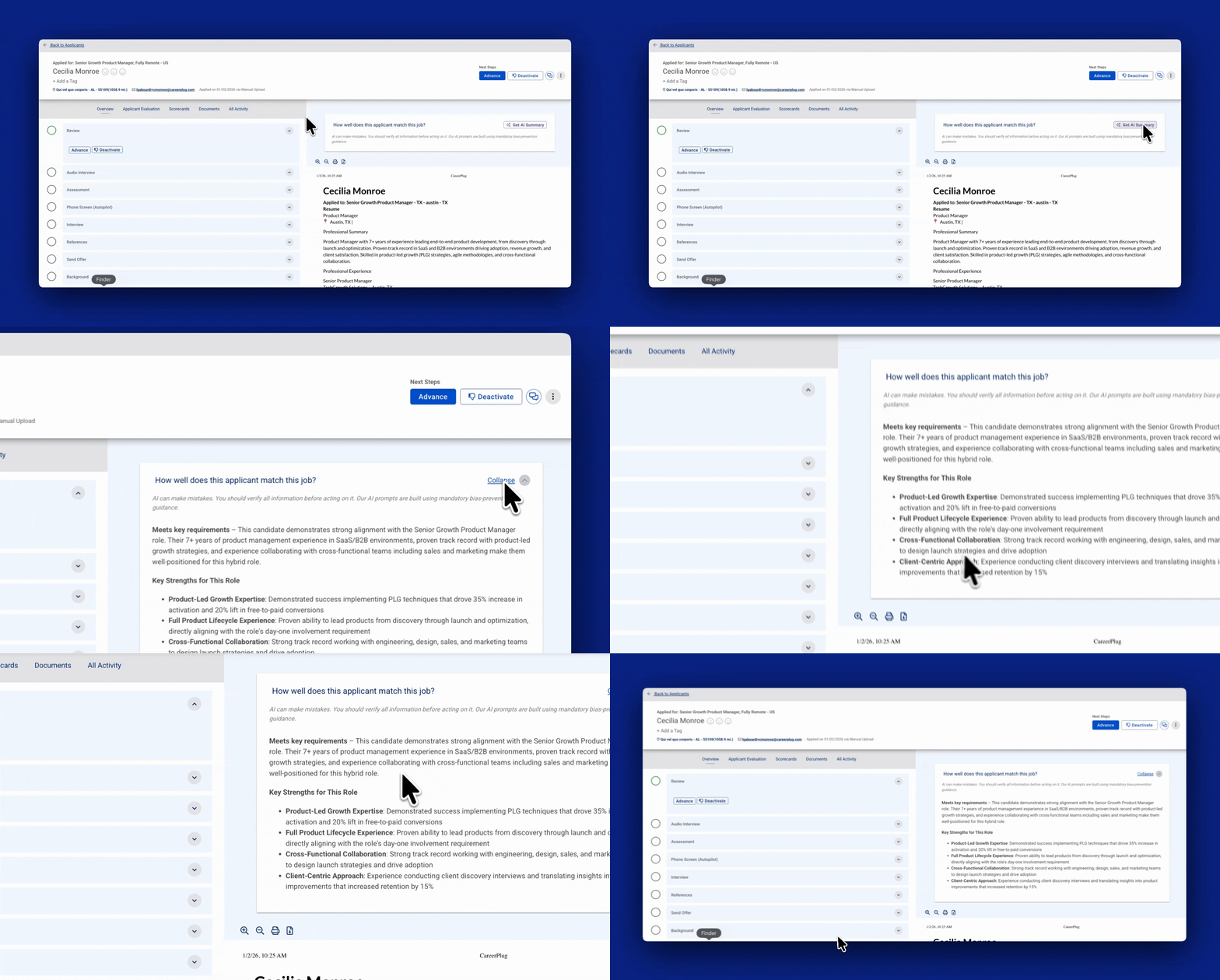
AI-Generated applicant summary helps you quickly understand applicant fit by turning resumes, applications and prescreen question answers into an easy-to-read summary. You get a concise, consistent view of each applicant's qualifications, highlighting relevant experience, skills, and how closely they align with the job’s requirements so you can decide which applicants to continue evaluating.
Please review and verify all AI-generated information before acting on it. Use this summary as a starting point and make sure to review all applicant details before making hiring decisions.
Job visibility status indicator
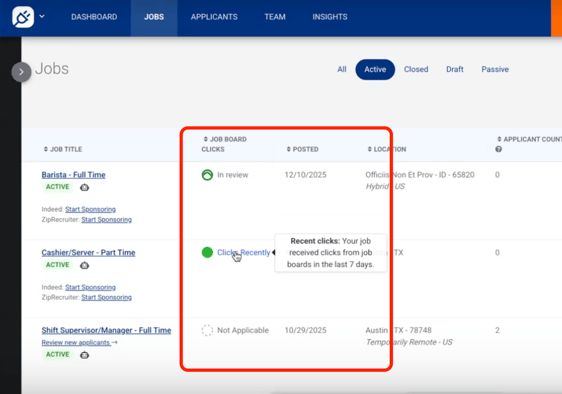
Instantly know when your jobs are live on job boards! With Job Visibility Status, you no longer need to wonder about the status of your job posting. You can also see how many clicks they received straight from your Jobs page!
Note: The Limited Plan does not post jobs to job boards - you'll need to update to a paid plan on your Plan and Billing page.
Critical Smart Suggestions

Never miss a job that needs urgent attention. We've added a new Critical Smart Suggestion that appears in red at the top of your suggestions list. You'll get immediate alerts when a job needs to be reviewed after 90 days or when we detect a duplicate posting. These high-priority alerts help you maintain job visibility and keep applicants flowing.
Learn more about Smart Suggestions.
Bulk assign Workflows
Still assigning workflows one by one? The new Bulk Workflow Assignment feature lets you assign Workflows to your direct reports or to your whole team in seconds!
This feature is available for CareerPlug accounts with a Grow plan subscription.
New Workflows page layout
Finding and managing Workflows is now easier. The redesigned Workflows page shows everything in one place: Workflows you've customized, Workflows from your partner, and ready-to-use Workflows from CareerPlug. No more clicking through multiple layers to see what's available.
This feature is available for CareerPlug accounts with a Grow plan subscription.
Workflows preview
See what's inside a workflow before you commit to using it. Now you can preview all the tasks in any workflow, whether it's from your partner or CareerPlug, before copying it to your account. No more guessing what might be in it or wasted time deleting workflows that aren't the right fit.
This feature is available for CareerPlug accounts with a Grow plan subscription.
Bugs that have been fixed over the last 30 days
We’ve been fine-tuning CareerPlug to ensure a smoother experience for you! Here are some of the key fixes we’ve made this month.
- Applicant profiles open where you need them – Profiles now open on the Evaluation tab (with pre-screen questions, assessments, and resumes) instead of Overview, saving you clicks.
- Employment Type is now on the Job page – We added employment type to job titles on the Jobs page so you can see Full-Time, Part-Time, etc. without opening each job. This does not change the actual job title that is sent to teh job boards.
- QR Code Poster is easier to find – Access to printing your QR Code posters is now on the Dashboard’s Careers Page dropdown menu instead of hunting through the Share menu.
- Duplicate postings on Indeed is a thing of the past – Some jobs were showing up twice on Indeed. Not anymore.
- Source conversion chart shows all clicks – The chart now displays all sources with clicks, not just the default ones.
- Drag and drop now works on the Background check step – You can now move candidate cards into the Background Check column without issues.
 Applicant Board View (Labs feature) updates when transferring candidates - When you move a candidate to another job, Applicant Board View updates immediately instead of making you refresh.
- Offer letter signatures stay put – Drawn signatures now appear correctly on PDF Offer Letters and don’t disappear.
- One-Way Audio Interview (Labs feature) – Drag and drop now works and candidate responses stay in the correct order.
- Prescreen Question edits save correctly – Your changes to prescreen questions now save instead of reverting to the previous value.
- State Tax Forms in alphabetical order – Forms are now alphabetized so you can find the right state quickly.
- Workflows assign properly – Pre-loaded Workflows now appear in user task lists as expected.
- Cleaner My Profile view on mobile – The My Profile section now takes up less space on mobile.
- Workflow Questionnaire Tasks now delete when you tell them to – Deleting Questionnaire items now works correctly.
- The Navigation Menu now looks sharper – We refreshed the top navigation with a cleaner look – new icons and better spacing to make room for new things to come!
- Application “Thank You” page displays correctly – Applicants will now see the full Thank You message after submitting their application instead of a blank space at the top of the page (only some applicants were experiencing this).
-
The “Create Job” button goes to the right place – The button now opens the job form even when you don't have Job Templates set up.
Share your thoughts!
We’re constantly working to make CareerPlug better for you, and your feedback is essential to making that happen!
If you’d like to schedule time with our Product team to provide feedback on CareerPlug, please schedule time with us here.