![CareerPlug-Logo-2025.png]](https://support.careerplug.com/hs-fs/hubfs/CareerPlug-Logo-2025.png?width=230&height=40&name=CareerPlug-Logo-2025.png)
From clearer onboarding tracking to improved application flows and automated screening, we're focused on removing friction and admin work so you can focus on building your winning team.
Not sure which plan you’re on? Visit the Plan and Billing page in your CareerPlug account or contact an Admin user.
“Onboarding Pending” Label
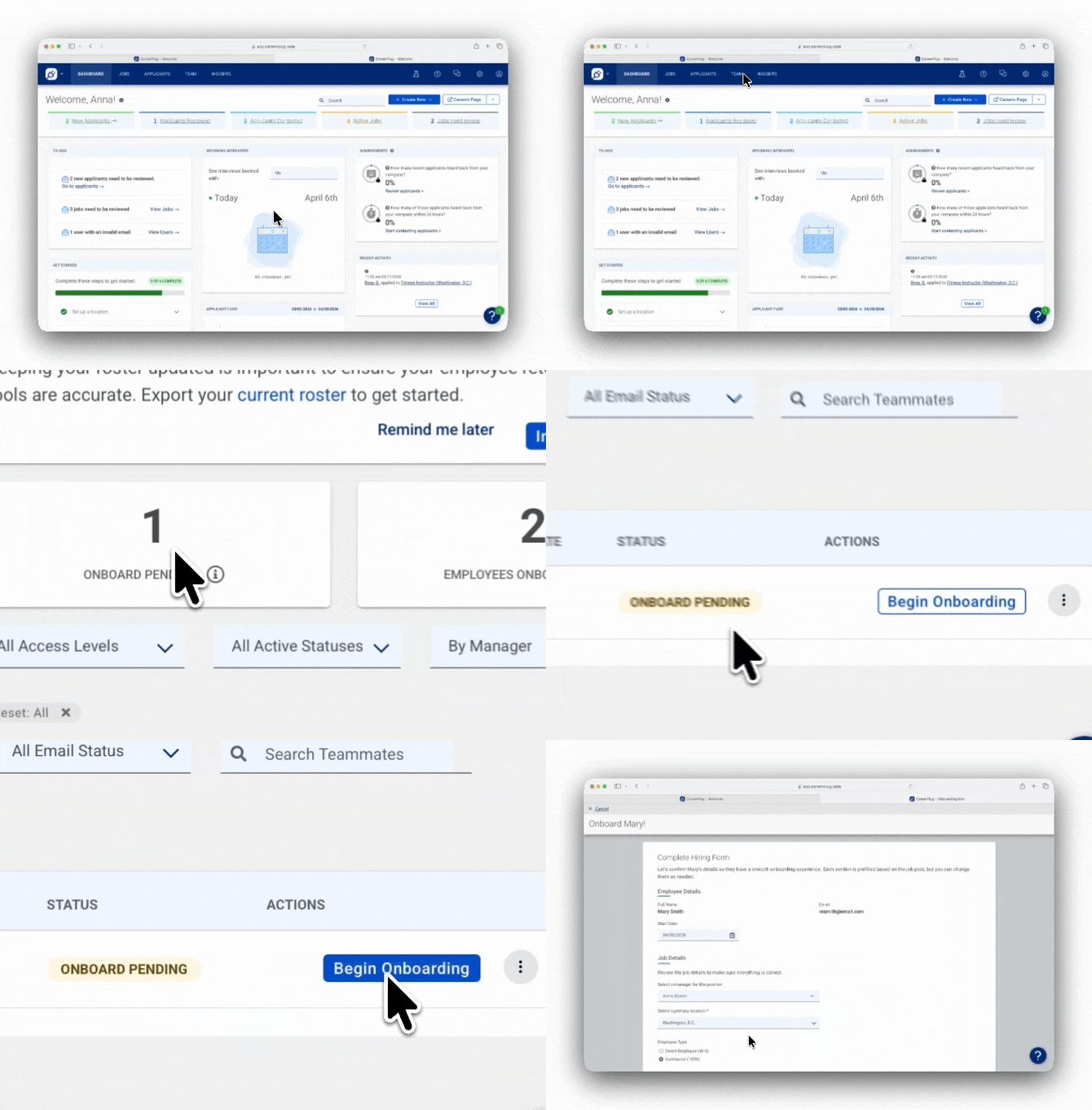
The updated Onboarding Pending label makes it instantly clear on your Team page which employees haven’t been assigned onboarding yet. You can also Filter the Team page by Status to see everyone who needs onboarding assigned or click on the Onboarding Pending tile at the top of the Team page to automatically filter by those employees. No more hunting through your Team directory wondering who you missed or accidentally skipped!
View your team’s onboarding status
This feature is available on a Grow plan subscription.
Autopilot (automated interview scheduling) Defaults to Primary Calendar
When you connect a new calendar to Autopilot (automated interview scheduling), it now defaults to your primary calendar instead of pulling in every shared calendar that you have access to in your account. This means clearer availability and fewer accidental double-bookings. You can still add other shared calendars if you want but now it doesn’t start out as the default!

Labs: One-Way Audio Interview
Screen candidates faster with less work. Once you’ve set up the One-Way Audio interview step in your hiring process, you can thumbs-up a candidate and the interview invite automatically gets sent to them. You’ll get notified when they complete their recording so you can review responses when it works for you and move top candidates forward quickly. Set it up once, thumbs-up candidates, and review their audio interviews on your time!
Turn on One-Way Audio Interview in Labs
Learn how to add One-Way Audio Interview to your hiring process
Learn more about Labs features


Updated “Apply with Indeed” Button
Same easy experience for applicants, now with improved technology. We’ve made a few behind-the-scenes updates for the Apply with Indeed button that displays on Careers Pages to make sure applicants keep flowing smoothly to your CareerPlug account. Applicants can still use their Indeed profile to apply when they click the button and their applications go straight to your CareerPlug account for you to review.
Learn more about the Apply with Indeed Button
Bugs that have been fixed over the last 30 days
We’ve been fine-tuning CareerPlug to ensure a smoother experience for you! Here are some of the key fixes we’ve made this month.
- Automations work on the second hiring step – You can now add email automations to the second step in your hiring process, just like any other step
- Express Post populates template fields – Job templates now correctly fill in all fields when using Express Post to post a job
- Assessment invite warning added – You'll now get a clear error message if you try to send assessment invites without selecting any assessments
- Custom benefits save on first try – Clicking "Finish Later" multiple times no longer prevents your custom benefits from saving
- Search works in the Employee Referral drawer – You can now search in the "To" field to find a specific employee when asking employees for referrals
- Jobs page stays put after edits – After editing a job, you'll stay on the same page instead of jumping back to page 1 (if you have multiple pages of jobs)
- Ampersands (&) display correctly in prescreen questions – The "&" symbol now shows up properly instead of converting to "&"
- Singular job titles no longer trigger plural warning – Smart Suggestions now correctly recognizes when job titles like "Barista" are singular
- Profile access works from dashboard – Clicking "My Profile" from the dashboard now takes you to your profile instead of redirecting back to the dashboard
- E-Verify citizenship options work correctly – Employees with "Alien Authorized to Work" status can now choose to enter either an Alien number OR an I-94 number, not both
- Manually assign W9 forms post-hire – You can now assign federal forms like the I-9 or W-9 to individual employees through their task lists after they've been marked as Hired
Share your thoughts!
We’re constantly working to make CareerPlug better for you, and your feedback is essential to making that happen!
If you’d like to schedule time with our Product team to provide feedback on CareerPlug, please schedule time with us here.
Not all features are available on every CareerPlug plan. Each description indicates which plans include access.